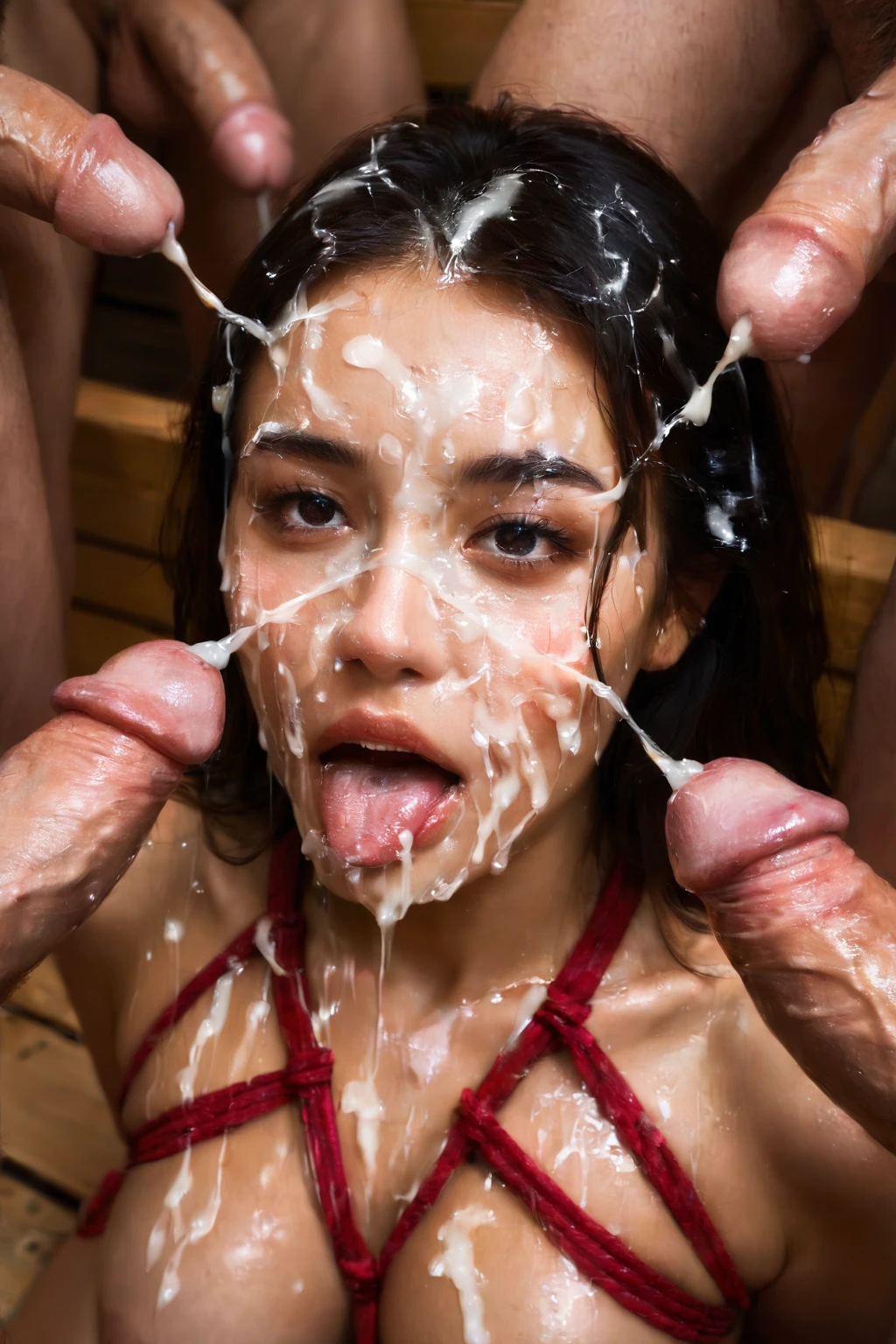

How to Generate Bukkake AI Images — Complete Guide
Some scenes are built around a single moment of release. This one is built around the pile-up: a woman at the center, a crowd around her, and the aftermath painted across her. It is loud, messy, and unmistakably a group finish — and on AINudeGirls you reach for it without writing a single line of prompt. You choose the category, and the platform assembles everything the scene needs.
Want to jump straight in? Try the AI generator, or scroll the bukkake category page to see where the style lands before you commit.
What Bukkake AI Image Generation Captures
Bukkake is a group finish. The image shows several men ejaculating onto one woman's face and body at once — multiple distinct streams of semen converging into a single heavy load. The sources have to read as separate and plural; one man releasing over and over does not satisfy the category, and neither does a frame carrying a single man's contribution. What sets it apart from an ordinary cumshot is exactly that count: many at the same time, all landing on her.
Getting Started on AINudeGirls
1. Open the Generate page and choose the Bukkake category.
2. Layer in any other categories you want in the scene before you kick things off — that is how you steer the setting and details.
3. Hit generate. Finished images land in your gallery as WebP files at 1312x1968.
Example Bukkake Prompts to Try
You never type these yourself — the platform writes them for you. They are shown here so you can see what the system feeds the model. The first is written as flowing prose, which suits models that read a scene like a sentence. The second is the same idea broken into comma tags, which is what Pony and booru-style models expect.
Prose form:
```text
POV shot of a young woman kneeling, her face glazed with multiple glossy translucent cum strands, (cum strings, cum bridge, ropes of translucent semen across her face, glistening realistic semen texture:1.3), thin strands hanging from her chin and extended tongue, looking up at the camera with a satisfied expression, bright soft lighting
```
Tag form (Pony/booru):
```text
(bukkake, cum on face, cum string, cum bridge, ropes of cum, translucent cum, glistening realistic semen:1.3), cum strands on face, open mouth, tongue out, kneeling, satisfied expression, looking at viewer, completely nude
```
To keep a batch from looking like fifteen copies of one image, the generator cycles through scene variants of the prompt. Two of those variants:
```text
POV first-person view of a young woman alone kneeling on a bedroom carpet looking up at the camera, her face and bare breasts completely drenched in thick layers of white cum with multiple streaks running from forehead down to chest, mouth open with tongue extended and cum on her tongue, eyes half-closed with parted lips in afterglow, hands on her own thighs, intimate close-up low-angle view, warm bedroom lighting, female alone in frame, no other people
```
```text
POV first-person view of a young woman alone kneeling on grass in a sunlit garden looking up at the camera, her face and bare breasts completely drenched in thick layers of white cum glistening in golden hour sunlight, mouth open with cum on her tongue, eyes half-closed with satisfied parted lips, intimate close-up low-angle view, warm sunlight, female alone in frame, no other people
```
Tips for Better Bukkake Results
- Keep bukkake and multiple cumshots in play — they anchor the model to the right category.
- Leave scene variant rotation on so a batch spreads across different setups instead of repeating.
- Reach for the climax family to sharpen the prompt toward this kind of finish.
- Steer clear of the classic misfires — gray sludge, an opaque white mask, merged bodies, poured milk, a bucket of liquid — by leaning on negatives that name them.
- Stick to one AI model to keep faces consistent from one generation to the next.
- Run a few at once. More candidates, better odds of a keeper.
Scene and Framing Choices
Nothing about that defining group finish locks you into one look. Framing is open: you can crowd the frame to show the sheer density of the load, or pull back to catch how the men are arranged around her. Wardrobe runs from bare skin all the way to clothing that ends up soaked. Lighting swings from bright studio setups that catch every strand to darker, moodier setups. And the mood itself can read chaotic or composed depending on how the streams and the men are placed. Vary all of it freely — just keep the scene inside the category's keywords rather than reaching for elements outside them.
Common Mistakes and Failure Modes
The usual slip is landing on the wrong side of the count — a single-source stream, or one man's contribution — instead of the group scene the category is after. That is where negatives earn their keep: naming the familiar failures (gray sludge, an opaque white mask, merged bodies, poured milk, a bucket of liquid) keeps the render pointed at the real thing instead of drifting into mush.
Bukkake vs Related Categories
A few neighboring categories look similar at a glance. Here is where the lines actually fall:
Category What it actually is
--- ---
bukkake (this guide) many men ejaculating onto her face and body, many streams / heavy load from a group
double anal TWO cocks stretching her ONE anus at the same time — one man lying beneath her, the second pressed behind her, both shafts side-by-side visibly entering the same anal opening, extreme stretch; both men's bodies in frame
gangbang ONE woman surrounded by AT LEAST FOUR men at once — count them: one penetrating her, one at her mouth, one in each hand or waiting beside her face; a wall of male bodies around her, every man visibly engaged
orgy a group scene with multiple couples/people all engaged in sex together
Real Bukkake Examples from Our Gallery
bukkake example 1
bukkake example 2
bukkake example 3
bukkake example 4
bukkake example 5
bukkake example 6
bukkake example 7
bukkake example 8
bukkake example 9
bukkake example 10
bukkake example 11
bukkake example 12
bukkake example 13
bukkake example 14
bukkake example 15
bukkake example 16
There are 22 in all over in the bukkake gallery, and if you want photoreal only, switch across to the realistic bukkake style.
Combining Bukkake with Other Categories
Bukkake lives in the climax family, and it only pairs with tags from inside that group — anal-creampie, creampie, cum-covered, cum-in-mouth, cum-on-ass, or cum-on-face. If you happen to pick two climax tags that clash, only the first one you chose shows up in the result; the later one is dropped.
One thing to expect no matter how you combine: a male partner is part of the act, so he appears in the output. There is a toggle for his presence in settings, but the category is built around having him in the scene.
Frequently Asked Questions
Q: My batch keeps coming out looking identical — how do I get more variety?
Leave scene variant rotation switched on. The generator then cycles through different setups for the same prompt instead of repeating one composition across the whole batch.
Q: Why do my results turn into a smeared white blob instead of separate streams?
That is the most common failure for this category. Lean on negatives that name it directly — gray sludge, opaque white mask, merged bodies, poured milk, bucket of liquid — to steer the render back toward distinct sources.
Q: Can I pair bukkake with a creampie tag in the same image?
Yes — both sit in the climax family, so they combine. Just remember that if two climax tags conflict, the one you picked first is the one that sticks.
Q: Do I have to write the prompt myself?
No. You pick the category and the platform builds the prompt. The examples above are only there to show you what it hands the model.
Related Guides to Explore
More on the categories that sit closest to this one:
- How to generate double anal AI images
- How to generate gangbang AI images
- How to generate orgy AI images
Everything else is indexed on the blog — ready when you want to build your own set on the AI Bukkake Generator.