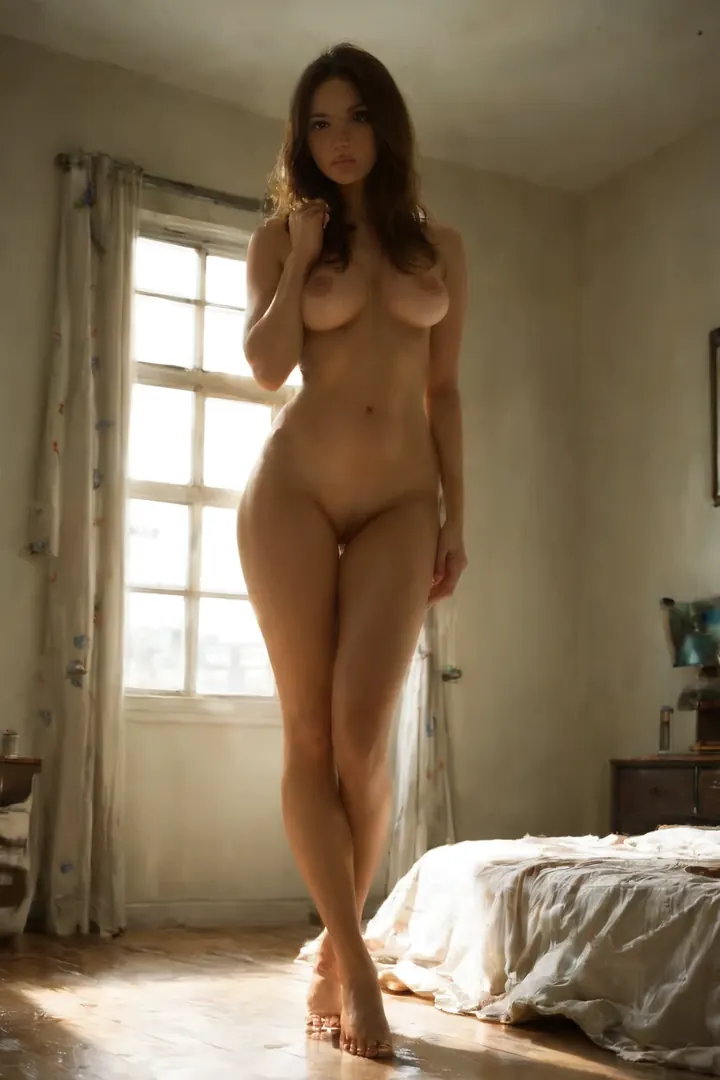

How to Generate Bedroom AI Images — Complete Guide
Late-afternoon sun leans through a half-drawn curtain and pools across the bed. The sheets are already pushed aside, creased from the shape of someone who was just here. The whole room goes warm and quiet. That is the feeling the bedroom category is built to catch — not a room, but a mood the light does to a room.
The bedroom category is ready to use in the generator, and this guide walks you through getting the most out of it.
What Bedroom Means Here
Bedroom, on this platform, is a specific scene rather than any room with a bed in it: a sensual, softly-lit bedroom with rumpled sheets and warm window light. Those three cues — the gentle light, the tangled bedding, and that glow coming in from outside — carry the intimacy, and an image is only really a bedroom image when all three are present. Strip the mood out and you are left with a flat interior that misses the point entirely.
Example Prompts to Try
You don't have to phrase any of this yourself. The generator assembles the prompt from the category you pick, and the setting clause it works from reads like this:
Modifier clause:
```text
in a sensual softly-lit bedroom with rumpled sheets and warm window light
```
Running Bedroom Generations Yourself
1. Open the Generate page, choose the bedroom category, and hit generate. Finished images drop straight into your gallery.
2. There's nothing to write. The platform composes the prompt from your category choice, then delivers WebP files at 1312x1968.
3. Sticking to one AI model keeps the face consistent across a run; the category and scene choice take care of the framing.
Example Images from the Bedroom Gallery
bedroom example 1
bedroom example 2
bedroom example 3
bedroom example 4
bedroom example 5
bedroom example 6
bedroom example 7
bedroom example 8
bedroom example 9
bedroom example 10
bedroom example 11
bedroom example 12
bedroom example 13
bedroom example 14
bedroom example 15
bedroom example 16
There are 50 examples in all over in the bedroom gallery, and if you want strictly photoreal frames, the realistic bedroom style is a click away.
Getting Variety Without Losing the Room
The scene holds up under a surprising amount of variation, so it pays to move the camera around. Pull back for the whole room and the bed reads as one warm island of light; push in tight on a creased pillow or the folds of a sheet and the same mood turns close and hushed. The window light itself is a lever — let it fall flat and even, or let it rake in low so it throws sharp shadows across the bedding. None of this asks you to change the setting; the soft light and the rumpled sheets are what tie every angle back to the same room.
A couple of habits help here:
- Run a batch rather than a single frame, then keep the strongest few from the set.
- Reuse the same AI model when you want successive generations to stay close to a face you already like.
Bedroom Compared to Nearby Categories
If you've been eyeing the other indoor and outdoor settings, here's how bedroom lines up against its closest neighbors:
Category What it actually is
--- ---
bedroom (this guide) in a sensual softly-lit bedroom with rumpled sheets and warm window light
beach secluded white-sand tropical beach, golden hour
bathroom luxurious modern bathroom, steam-fogged glass
balcony private high-rise balcony at sunset, city skyline
Combining Bedroom With Other Categories
Bedroom sits in the setting family alongside balcony, bathroom, beach, camping, car-sex, and casting. Since a scene can only happen in one place, if you pick two settings at once only your first choice actually shows up — the bedroom wins and the other is quietly ignored. The category also stays a solo scene and won't stage multi-person interactions.
Frequently Asked
Q: Why do my bedrooms come out looking like plain, empty rooms?
That's almost always a missing cue. If the soft lighting, the rumpled sheets, or that warm glow from the window isn't there, the frame loses the mood and reads as a generic interior. Regenerate and you'll usually land back inside the real scene.
Q: Can I put a male partner in the shot?
Yes. The default bedroom has none, but flipping on the explicit male-partner toggle in the generator adds one.
Q: Do I need to write the prompt myself?
No — pick the bedroom category and the platform builds the prompt around it for you.
Q: I chose a second setting too. Why did it vanish?
A scene lives in one place, so when two settings are selected only the first one takes effect. Bedroom and, say, balcony can't share a frame.
More Guides
Close neighbors worth a look:
- How to generate beach AI images
- How to generate bathroom AI images
- How to generate balcony AI images
The full set is over on the blog index. Pick the bedroom category, chase that warm-window mood, and generate a few of your own.