
How to Generate Outdoors AI Images — Complete Guide
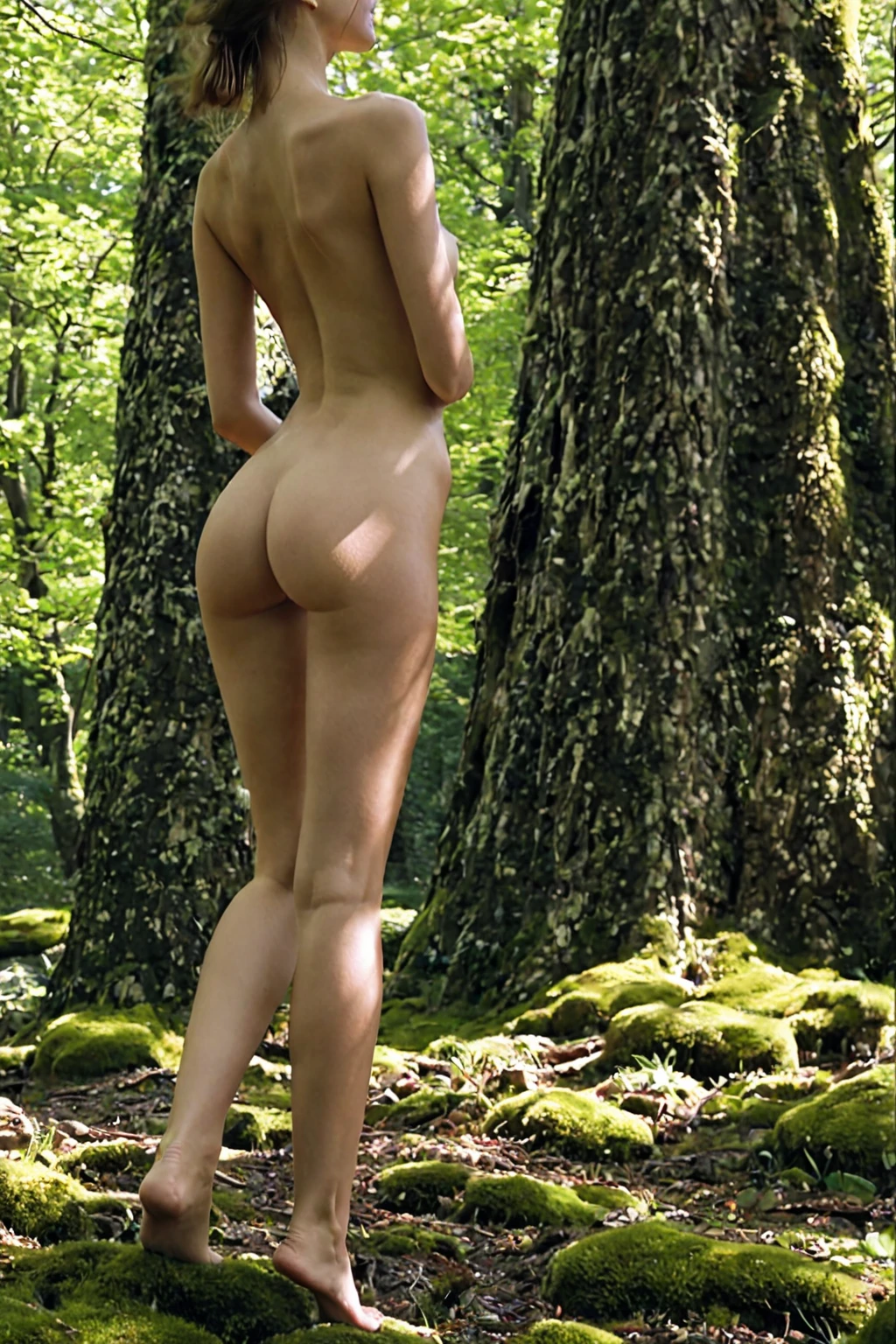
Moss on the bark, moss underfoot, and sunlight arriving in broken patches instead of an even wash. That is the texture brief for this category, and it is narrower than the word "outdoors" suggests. There is no open field here, no roadside greenery, no backyard with a tree in the corner of the frame.
Nothing gets typed, either. You choose the category, start the generation, and the clearing arrives already built — trees, light and mood included. Go straight to the generator, or look at what the finished scene actually delivers first.
Defining Outdoors
On this platform, outdoors names exactly one scene: a secluded, sunlit forest clearing ringed by ancient, moss-covered trees, lit by dappled sunlight breaking through the canopy overhead.
Read that as a materials list rather than a mood board. Secluded means untouched — no trail cutting through, nobody else in frame, no sense of being watched. Ancient and moss-covered are what separate old-growth from a suburban park: thick trunks, deep bark texture, green growth clinging to the north side of things. Dappled is the lighting instruction, and it is the fussiest of the three. Light that has been broken up by leaves falls in irregular bright patches against shadow. Light that hasn't just looks like a portrait taken near some trees.
Remove any single element and the whole thing collapses into something else. A clearing without old trees reads as a meadow. Trees without moss read as a park. Even sunlight — if it lands flat and shadowless — moves the image into a different hour of the day and a different mood entirely.
Step by Step
1. Open the Generate page and pick outdoors. You can pick more than one category in the same run; the clearing is what outdoors contributes to the mix.
2. Start the generation. Results land in your gallery — there is no settings screen standing between the two.
3. What comes back is WebP at 1312x1968. That is the output for this category, every time, so you know the file you are getting before you commit credits to it.
On credits: a single image costs 15. A five-image set is 68 and a ten-image set is 120, which matters here more than in most categories — forest light and framing shift noticeably from shot to shot, and picking a favourite out of five beats trying to land it in one.
outdoors example 1
outdoors example 2
outdoors example 3
outdoors example 4
outdoors example 5
outdoors example 6
outdoors example 7
outdoors example 8
outdoors example 9
outdoors example 10
outdoors example 11
outdoors example 12
outdoors example 13
outdoors example 14
outdoors example 15
outdoors example 16
There are 29 examples in the full outdoors set, and a photoreal-only cut of the same scene if you want the realistic style on its own.
Avoidable Mistakes
Flat light. This is the failure that ruins otherwise good images. When the exposure comes back even and shadowless, the canopy has stopped doing its job, and the picture drifts out of the category no matter how well the rest of it holds up. You want visible contrast between the bright patches and the shade around them — on the moss, on the bark, on skin.
Scenery that never commits. Trees somewhere in the background is not the same as a clearing surrounded by them. If the frame could plausibly be a park, a verge or a large garden, it has landed short of what this category is built to produce.
Thin, young trees. Age and moss are load-bearing. A stand of slim saplings gives you greenery without seclusion, and seclusion is half of what makes the scene feel like a private place rather than a location.
Working Prompt Examples
You never write any of this by hand — the platform composes it — but it is worth seeing what outdoors actually adds to a generation. This clause is the category's entire contribution:
Modifier clause:
```text
in a secluded sunlit forest clearing surrounded by moss-covered ancient trees, dappled sunlight
```
Three anchors, doing three separate jobs. *Secluded sunlit forest clearing* sets the space and its privacy. *Moss-covered ancient trees* supplies the material and texture that ring it. *Dappled sunlight* fixes the quality of the light falling into it. Everything else — pose, framing, expression, how much forest sits behind the subject — is still free to move.
Five words steer that framing without disturbing the anchors. Outdoor keeps the shot tight inside the clearing. Nature and forest widen it out, giving more weight to trunk texture and moss coverage and the depth behind the subject. Garden adds a hint of cultivated structure at the wild edge — a framing shift, not a different place. Outside is the housekeeping one: it keeps wardrobe and props tied to a natural setting so no indoor furniture or lighting fixture wanders into shot.
Because outdoors is a setting rather than a scene, it does its best work stacked with a category that brings a subject. Pick it alongside working-out, and the exercise scene keeps its subject while the clause above replaces the gym:
```text
a young woman exercising in nothing but tight workout shorts, sweat glistening on her toned muscles and bare breasts, dramatic gym lighting on her flexed body
```
Or pair it with yoga, where the studio windows give way to the canopy and the pose carries over intact:
```text
a completely nude young woman holding a deep downward-dog yoga pose on a thin mat in a bright airy studio with large windows, her flexible toned body fully exposed, hips lifted high and back lengthened, her bare breasts hanging free and her shaved pussy visible between her thighs, perfect athletic form on display, she gazes back toward the camera with a calm sensual expression, soft diffused morning light from the windows accentuates her lean muscles and smooth skin, serene erotic atmosphere, female alone in frame, no other people
```
That is the pattern: one category brings the body and the action, outdoors brings the ground it happens on.
Pairing Outdoors
Outdoors sits in the same group as balcony, bathroom, beach, bedroom, camping and car-sex — all of them settings. Pick two settings in one run and only the first one shows up, because a forest clearing and a bedroom cannot share a background. So lead with the one you actually want.
It is also a single-subject scene. Multi-person setups are not part of this category, and stacking it with something that expects a crowd will not produce one.
Easily Confused With
Three neighbours account for most of the mix-ups:
Category What it actually is
--- ---
outdoors (this guide) in a secluded sunlit forest clearing surrounded by moss-covered ancient trees, dappled sunlight
bedroom in a sensual softly-lit bedroom with rumpled sheets and warm window light
beach secluded white-sand tropical beach, golden hour
bathroom luxurious modern bathroom, steam-fogged glass
Beach is the one to watch. Both are secluded, both run on natural light, and the two get requested interchangeably — but beach means open sky and sand, and outdoors means canopy and understory. Horizon and water in frame instead of bark and moss? You have wandered into beach.
Outdoors Questions
What shows up if I pick outdoors and change nothing else?
A secluded, sunlit forest clearing ringed by ancient, moss-covered trees, with dappled sunlight coming through the canopy overhead.
Can I get a male partner into the scene?
Not on its own. Outdoors renders solo, and a second figure appears only if you switch on the male-partner toggle yourself before generating.
Can I keep the same woman across a series of forest shots?
Yes — pick the same AI model and generate with it each time. That is the route to take when you are building a set rather than chasing one good frame.
Does every outdoors image look identical?
No. The clearing, the old trees and the broken light stay constant; framing, pose and how much forest sits behind the subject vary from generation to generation. Running a five- or ten-image set is the cheapest way to see that spread.
Three neighbouring settings, each with a guide of its own:
- Bedroom: soft light, rumpled sheets
- Beach: open sky, sand, golden hour
- Bathroom: steam, glass, modern surfaces
Every category guide is indexed on the blog. When you are ready to see the clearing for yourself, the generator is one click from here.