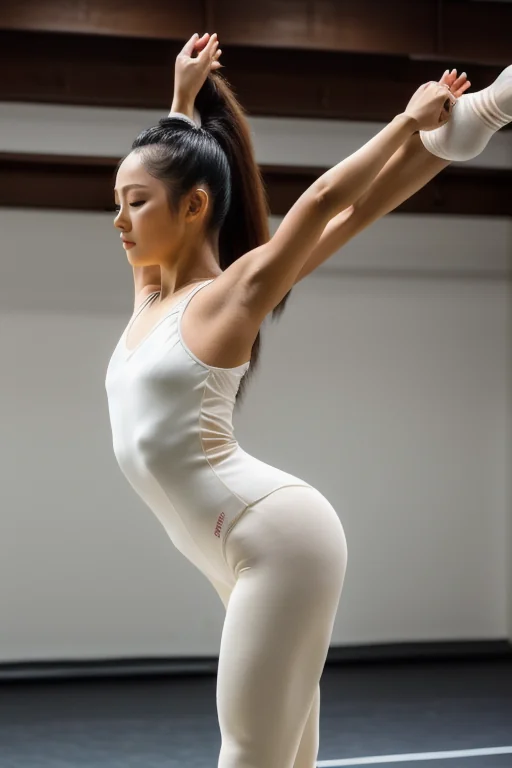

How to Generate Split Position AI Images — Complete Guide
A seamless studio backdrop, a hard key light off to one side, and a single rim light running the length of a leg that goes straight up past the model's ear. That is the frame split position is built around — the light doing its work along one long vertical line, the room stripped back so nothing competes with the stretch. Swap the studio for warm lamplight and white sheets and the geometry survives; it is the leg line, not the room, that makes the shot. On AINudeGirls the split position category assembles that scene for you: choose it, hit generate, and the platform writes the description, holds the split extreme, and keeps the anatomy where it belongs.
Pick it up in the generator when you want to make one. The split position category page holds finished results if you'd rather judge the look before spending anything.
Defining Split Position
Split position is a woman holding a full leg split — one leg planted or grounded, the other extended straight up or stretched out behind — with penetration taking place inside that stretch. One leg high, real extension, the pose visibly costing something to hold. That is the whole definition, and everything below refers back to it.
The distinction that matters: a flexible split and a pair of wide-open legs are two different requests. Plenty of spread-leg poses involve penetration without a trace of anything acrobatic — no elevated leg, no dancer's line, nothing that says the model is doing something difficult. The acrobatic split is the point. If the extension isn't legible at a glance, the image has missed the category regardless of what else is happening in frame.
Getting a Split Position Image Out
1. Open the Generate page, select split position, and start the generation. There is nothing to tune and nothing to type.
2. The finished file arrives in your gallery as WebP at 1312x1968 — ready to view or download as-is, no conversion step on your end.
3. Budget for more than one. A single image runs 15 credits; a set of five is 68 and a set of ten is 120, which is the cheaper way to work with a pose this demanding.
That last point isn't padding. Extreme extension is one of the harder things to resolve cleanly, so the sensible workflow is to pull a small batch and pick the strongest frame rather than treating the first result as final. If earlier attempts drifted on the face, sticking to one AI model gives the generation something to anchor to. And if you want the backdrop to change between images — studio, bedroom, different camera heights — leave scene variant rotation on; switch it off when you want a consistent set with the same lighting logic and mood across every frame.
What Trips People Up
The common miss is a framing one. People reach for split position when what they actually want is "bendy" or "acrobatic" in a loose sense, and a loose intent produces a loose result: legs apart, nothing extended, that defining look nowhere in the frame. If a genuine split isn't what you're after, a different category will serve you better.
The harder problem is anatomical, and it is worth knowing about in advance. A full split pushes limb and joint resolution to the edge, which makes this one of the categories most prone to visible errors — limbs that merge into the torso or into each other, an extra leg or a doubled foot where the split geometry gets confused, genitals rendered adrift from the body's actual position. The platform steers generation away from those known failure points rather than leaving you to sort through flawed images yourself, and the specific vocabulary it leans on — split position, full split, gymnast, flexible split — pulls hard toward the acrobatic leg line instead of a generic spread.
None of that makes every frame perfect. A stray limb or a seam that doesn't sit right is a known cost of the pose, not a sign anything is broken. Regenerate and move on.
Prompts and Settings That Work
You never write any of this yourself — the platform composes it the moment you pick the category. But it is useful to see what it composes, because it tells you exactly what the category is optimising for.
The descriptive form reads like a photographer briefing a shoot:
```text
a completely nude young woman performing a full standing split in a professional photography studio against a seamless backdrop, one leg planted on the floor and the other raised straight up vertically beside her head, her extreme flexibility and toned dancer's body on full display, her bare breasts and shaved pussy fully exposed by the open pose, she looks toward the camera with a confident sultry smile, crisp dramatic studio lighting with a soft key light and rim light sculpting her smooth athletic skin, elegant erotic atmosphere, female alone in frame, no other people
```
Read it in pieces and the priorities are obvious. The pose comes first and in unmistakable terms — *one leg planted on the floor and the other raised straight up vertically beside her head* leaves no room to interpret this as a spread. Then the body: *extreme flexibility*, *toned dancer's body*, which shapes build and muscle tone to match the pose rather than contradicting it. Then what's exposed, then expression, then a full lighting brief — key light plus rim light, the setup that carves the raised leg out of the background. The closing *female alone in frame, no other people* is a fence, not a description: it stops extra bodies wandering into the shot.
The same scene also exists in tag form, which is denser and weighted:
```text
(standing split, vertical split, one leg raised straight up:1.3), flexible, athletic body, exposed pussy, bare breasts, studio backdrop, confident sultry smile, rim lighting, completely nude
```
The parenthesis with `:1.3` on the end is emphasis. Those three pose terms are pushed above everything else in the line, so if any element of the description is going to win, it is the split itself. Everything after the bracket — build, exposure, backdrop, expression, lighting — fills in around that anchor.
Rotation draws from more than one setup so a batch doesn't come back looking like sixteen copies of the same photo. Side by side, the two scenes it alternates between:
```text
a completely nude young woman performing a full standing split in a professional photography studio against a seamless backdrop, one leg planted on the floor and the other raised straight up vertically beside her head, her extreme flexibility and toned dancer's body on full display, her bare breasts and shaved pussy fully exposed by the open pose, she looks toward the camera with a confident sultry smile, crisp dramatic studio lighting with a soft key light and rim light sculpting her smooth athletic skin, elegant erotic atmosphere, female alone in frame, no other people
```
```text
a young woman alone performing a full front split on white sheets, completely nude with her front leg extended toward the camera and her back leg stretched behind, her completely shaved smooth pink pussy pressed open against the sheets by the split, back straight and bare breasts forward, confident sultry smile at the lens, warm bedroom lighting, low front-angle view, full body visible, female alone in frame, no other people
```
Standing versus front split, studio versus bed, dramatic key light versus warm bedroom light, camera at height versus low and close. The pose logic is identical; the room, the light and the angle are what move. That is also where the tonal range of this category lives — a wide frame and even studio light read gymnastic, emphasising the taut line from floor to raised foot, while a low angle and hard directional shadow turn the same split into something moodier. Wardrobe swings it further without touching the pose at all: athletic pieces lean into the dancer reading, lingerie or nothing at all pushes it straight to erotic.
Real Split Position Examples from Our Gallery
split position example 1
split position example 2
split position example 3
split position example 4
split position example 5
split position example 6
split position example 7
split position example 8
split position example 9
split position example 10
split position example 11
split position example 12
split position example 13
split position example 14
split position example 15
split position example 16
All 30 examples live in the split position gallery, and the photoreal-only cut narrows it to the realistic style.
Stacking Split Position With Other Picks
Split position is a scene, and a generation only takes one scene. Pick two and just the first one you chose makes it into the image — which is deliberate, because two competing setups pull a composition apart. Choose the split or choose the other scene; you can't have both in the same frame.
Outside of scene tags it layers freely. 69-position, against-wall, ahegao, all-fours, amazon-position and anal are all valid alongside it, so the act and the intensity are yours to set on top of the split. The one hard limit is headcount: this category renders a single woman, and multi-person is switched off for it.
Easily Confused With
The categories split position gets combined with, or mistaken for:
Category What it actually is
--- ---
split position (this guide) she holds a full leg split while penetrated, one leg high
cowgirl she straddles and rides the man who lies on his back, she is on top and upright
doggy style penetration from behind while she is on all fours or bent forward, penetrator kneeling behind her
missionary she on her back, legs spread or around him, penetrated from on top face-to-face
Read down that column and the split is the odd one out: the others are defined by who is over whom, this one by what the body is doing. That is why intent closer to general flexibility than to a genuine split will land better somewhere else.
Common Questions
Can I get a partner into the shot?
Not without asking for it. Solo is the base scene, and a male partner is opt-in — the control for him sits in the generator and starts off.
Will I actually get a split, or just legs apart?
A split. The pose terms carry the heaviest weight in the composed description, so the raised leg and the extension are the last things to give way — that is exactly what separates this category from a generic spread.
Why does the background keep changing between my images?
That's scene variant rotation doing its job. The category works from more than one setup, so a batch mixes studio and bedroom framings. Turn rotation off if you want one consistent look across a set.
What file do I get back?
WebP at 1312x1968, delivered straight to your gallery.
Nearby Guides
The three closest neighbours to this pose:
Every category guide is indexed on the blog.